Home / Features
Feature overview
Caché Monitor was a development tool designed for InterSystems Caché. It combined database tools with a SQL editor to give Caché developers, administrators and data analysts easy access to the database. Connections to Caché servers were organised in groups, and the tool also connected to Microsoft SQL Server, Microsoft Access, MySQL and more for heterogeneous environments.
The table maps the classic Caché Monitor feature areas to the SQL DATA LENS documentation where each one lives today. The historic edition comparison is on the feature list by edition.
| Caché Monitor feature | What it did | In SQL DATA LENS |
|---|---|---|
| Server Navigator | Register Caché and IRIS servers and JDBC connections, organise them in groups and folders by drag and drop, browse namespaces, tables, views, procedures, classes and globals in one tree. Import connections from the Caché Server Manager and from ODBC data sources. | Navigator, connection environments |
| Namespace navigation | All namespaces of a server are listed automatically. No need to know namespace names or configure a JDBC URL per namespace. | Working with namespaces |
| SQL editor (Query Analyzer) | Syntax colouring, code completion with table, column, key and index information, multiple editors, scripts with several statements, execute statement at cursor or selection, parameterised queries, SQL formatter, SQL history, execution plan with index selectivity, result as grid or text. | SQL editor, SQL performance |
| Table Browser / TableViewer | Browse table data with row and character limits, filters, row counts for all tables, storage details per table, DDL source, tune table. | Table viewer |
| Data Inspector | View cell content as text, HTML, highlighted XML or JSON, binary data and images (BMP, TIFF, PNG, GIF, JPEG) from BLOB and CLOB columns. | Data inspector |
| Global Browser | Navigate through globals and nodes of a Caché or IRIS namespace, including $LIST elements and unicode content. | Global Browser |
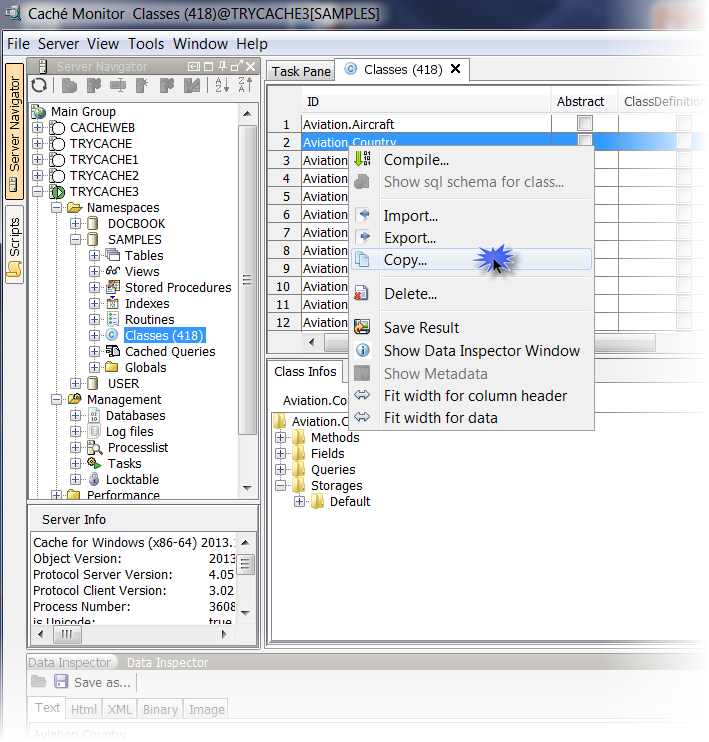
| Class Navigator | Browse class definitions, export and import classes with compile, copy classes between servers and namespaces including dependencies. | Class viewer, source code search |
| Database diagrams | Visualise tables, columns, keys and relationships. Diagrams are stored in the associated database and updated when tables change. Copy a diagram image to the clipboard. | Database diagrams |
| Query Cloud | One SQL statement across several Caché or IRIS servers, namespaces and external sources such as SQL Server, Access or CSV files, with JOINs and nothing installed on the server side. | Query Cloud |
| Scripts Manager | Organise script libraries with a fast live preview, open SQL files directly in the editor. | Script manager |
| Export | Grid data to CSV, HTML, XLS, XLSX, XML, SQL, text and JSON, execute directly to file with constant memory, open results straight in Excel, bulk export wizard. | Part of the SQL editor and table viewer |
| Administration | View Caché CPF files, processes, stored procedures, system objects and namespaces, tune tables, calculate table sizes. | Administration |
| Other databases | Microsoft SQL Server (including Windows authentication), Access, MySQL, PostgreSQL, Oracle, SQLite, H2, CSV and Excel files via bundled JDBC drivers. | Beyond IRIS, Azure SQL and Fabric |
New since the rename
SQL DATA LENS adds capabilities that Caché Monitor never had, among them an AI assistant for SQL, secure connections with TLS and SSH, source code search across classes and routines, and a privacy model in which the application only connects out for update checks and licence activation. See the complete SQL DATA LENS feature overview and edition comparison.
Screenshots from the Caché Monitor era


Frequently asked questions
Which databases did Caché Monitor support besides InterSystems Caché?
InterSystems IRIS (natively since 2.93), Microsoft SQL Server, Microsoft Access, MySQL, PostgreSQL, Oracle, SQLite, H2, CSV files and Excel files via JDBC. SQL DATA LENS extends this list, including Azure SQL and Microsoft Fabric. Note that SQL DATA LENS itself currently runs on Windows only; Caché Monitor ran on any platform with Java.
What is Query Cloud?
Query Cloud lets you write one SQL statement across several Caché or IRIS servers, namespaces and external sources such as SQL Server or CSV files, including JOINs, with nothing installed on the server side. It is still a core feature of SQL DATA LENS.
Did the Home Edition include the SQL editor?
Yes. The Home Edition had the full SQL editor, Global Browser, Class Navigator and database diagrams, but only one registered server on localhost and CSV export only. The complete edition comparison is on the feature list page.
Where is the Global Browser in SQL DATA LENS?
It is still called Global Browser and works for Caché and IRIS connections. See the SQL DATA LENS Global Browser documentation.
Continue with SQL DATA LENS
SQL DATA LENS is the current release of this tool: native InterSystems IRIS and Caché support, SQL editor, Global Browser, database diagrams, Query Cloud and much more. Free Edition and a full 30-day Pro trial with every download, no registration.