Monday, 23 November 2009
 
Home
Cachè Monitor
Features
Server Navigator
SQL Editor
SQL execution plan
Release Notes
Screenshots
Installing
Documentation
FAQ
Contact
About
SQL
InterSystems Caché
Login
Links
Sitemap
Cache Online Docs
Product information
Latest News
Caché Monitor
Welcome to the home of Caché Monitor

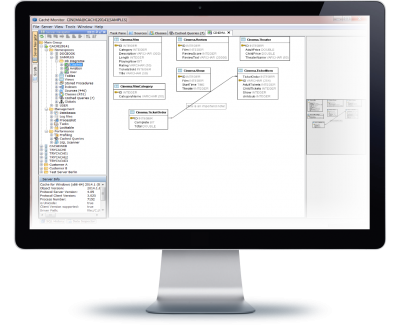
Caché Monitor is an FREEWARE SQL development and tuning tool for InterSystems database Caché.

It is is platform-independent and help to edit SQL queries and scripts with code completion,

syntax highlighting, SQL formatting.


Caché Monitor for InterSystems Caché

These are the key features:

  • Caché-SQL Code completion provide context sensitiv information about database objects (Tables,Views,Columns and Indexes), also known as Intellisense.

  • SQL abbreviations, Type: se and the Editor complete to "SELECT * FROM "

  • SQL History buffer for executed SQL commands

  • SQL Code formatting

  • Parallel (multi-threaded) queries

  • Graphical SQL execution plan with index and selectivity information for used indexes in query plan

  • TuneTable (calculate column selectivity) for selected Table(s) or whole Namespace

  • MetaData-Browser for Namespaces,Tables,Views,Routines,Classes,CachedQueries,Stored Procedures,Indexes

  • Viewing Locktable (database locks) and Processlist
    with easy navigation between them with the context menu.

It can be used from any platform with an JAVA 6 (1.6) (Linux, Windows,...)

Caché Monitor for InterSystems Caché


The forum contains messages from people using Caché Monitor. Join the discussion! If you have a question about Caché Monitor or how to use them, please visit the Caché Monitor Support Forum for answers and help from other users.


If you do not know InterSystems CACHÉ, here are some information about the database from InterSystems: InterSystems CACHÉ is a post-relational database that uniquely offers three integrated data access options: a robust object database, high performance SQL, and rich multidimensional access. Caché enables rapid Web application development, extraordinary transaction processing speed, massive scalability, and real-time queries against transactional data - with minimal maintenance requirements. Caché is available for Windows, OpenVMS, Mac OS X, Linux and major UNIX platforms and it is deployed on systems ranging from two to over 50,000 simultaneous users. For more details, please visit InterSystems website.


If you need a SQL Query Tool for any other Database than Caché? Please read ahead. These tools are very good:

  • The Universal Database Tool - DbVisualizer is a database tool useful for developers and database administrators to aid develop and maintain their databases. It is the perfect solution since the same tool can be used on all major operating systems accessing a wide range of databases.
    [YES! It can also connect to Caché, like Caché Monitor ;) ]

  • Aqua Data Studio - is a database developer's complete Integrated Development Environment (IDE). The IDE provides three major areas of functionality: A) Database query and administration tool B) Suite of compare tools for databases, source control and filesystems, and C) a complete and integrated source control client for Subversion (SVN) and CVS
    [Again another Java and JDBC based Query Tool. So it can also connect Caché]
  • SQuirrel SQL The SQuirreL SQL client provides a simple graphical interface to relational databases. Because it is built using Java, it can access any JDBC-compliant database running on any machine, allowing remote access to multiple databases. A SQuirreL user can:
    - easily view and edit data in any JDBC-compliant database,
    - view the database’s meta-data,
    - work with multiple databases on both local and remote machines,
    - use a single, consistent interface to work with different database engines, and
    - expand the tool’s capabilities and include DB-specific functionality using plugins.

You find more JAVA/JDBC based Client Tools here.


Database News
Database Journal News
Daily Database News and Information for the Database Professional
  • XPath Support for Working with XML Data in MySQL
    During the past few weeks, we've been getting better acquainted with XML support in MySQL. This article finishes the series by talking about how to manipulate XML data using the XPath, which is a language for navigating and querying XML documents.


  • Fast-Start Failover in Oracle 11g Data Guard
    Learn how to set up and control automatic failover using the Fast-Start Failover Observer, so that DBA intervention is no longer required during a disaster recovery scenario.


  • Data Formatting, Working with XML Data in MySQL
    Today's article continues to explore XML support in MySQL. Specifically, we'll look at a nicer way to format our resultset. We'll also discuss how to retrieve all of the records from the XML document, using a stored procedure.


You like this tool?

Support Caché Monitor


If you like Caché Monitor please feel free to donate money via PayPal. more

Login


Enter what you see:
This image contains a scrambled text, it is using a combination of colors, font size, background, angle in order to disallow computer to automate reading. You will have to reproduce it to post on my homepage tips: hit Reload page before writing a text if you have difficulty reading characters in image
Lost Password?
No account yet? Register
Build On NetBeans
Build on NetBeans Web Standards
Syndicate
Advertisement